If you want AI help with your Klaviyo account, start with the job you want done. Drafting a campaign, estimating which customers may buy again and asking an outside AI assistant to read your reports use different parts of Klaviyo. They also come with different controls and limits.
Klaviyo AI can help you draft marketing with Composer, estimate customer behavior with predictive analytics, and work through an external AI assistant using its MCP connection. Customer Agent handles service conversations. Composer needs your approval before publishing customer-facing content, and its free usage is limited. Predictions need qualifying data; external connections need their own access controls.
Our view is that Klaviyo’s AI capabilities are not great yet, though improving. The useful question is what you can ask them to do today, and what you will still need to check yourself. For the whole-platform verdict, see our Klaviyo review.
Which Klaviyo AI feature do you need?
Klaviyo AI covers several capabilities. Composer is the marketing agent inside your account. Predictive analytics estimates future customer behavior from your data. The MCP server lets a compatible external AI assistant work with Klaviyo through an authorized connection. Customer Agent handles service questions.
| What you want to do | Where to start | What it does | What to check |
|---|---|---|---|
| Draft a campaign or inspect an existing flow | Composer | Analyzes your account, audits work and drafts campaigns, flows or segments | The output, your approval and remaining usage |
| Estimate future customer spending or next-order timing | Predictive analytics | Produces customer estimates from order data | Data eligibility and what each prediction means |
| Ask an external AI assistant to work with your Klaviyo account | Klaviyo MCP server | Gives a compatible client access to supported reporting and account actions | Your role, granted permissions and whether write tools are enabled |
| Answer customers’ service questions | Customer Agent | Handles questions and product recommendations, with configurable human handoff | Which work you allow it to handle and when it should escalate |
Capabilities checked on 18 November 2026. Availability, account permissions and product limits still apply.
For ordinary flows, forms and integrations, use our Klaviyo features guide.
What can Composer do for your marketing?
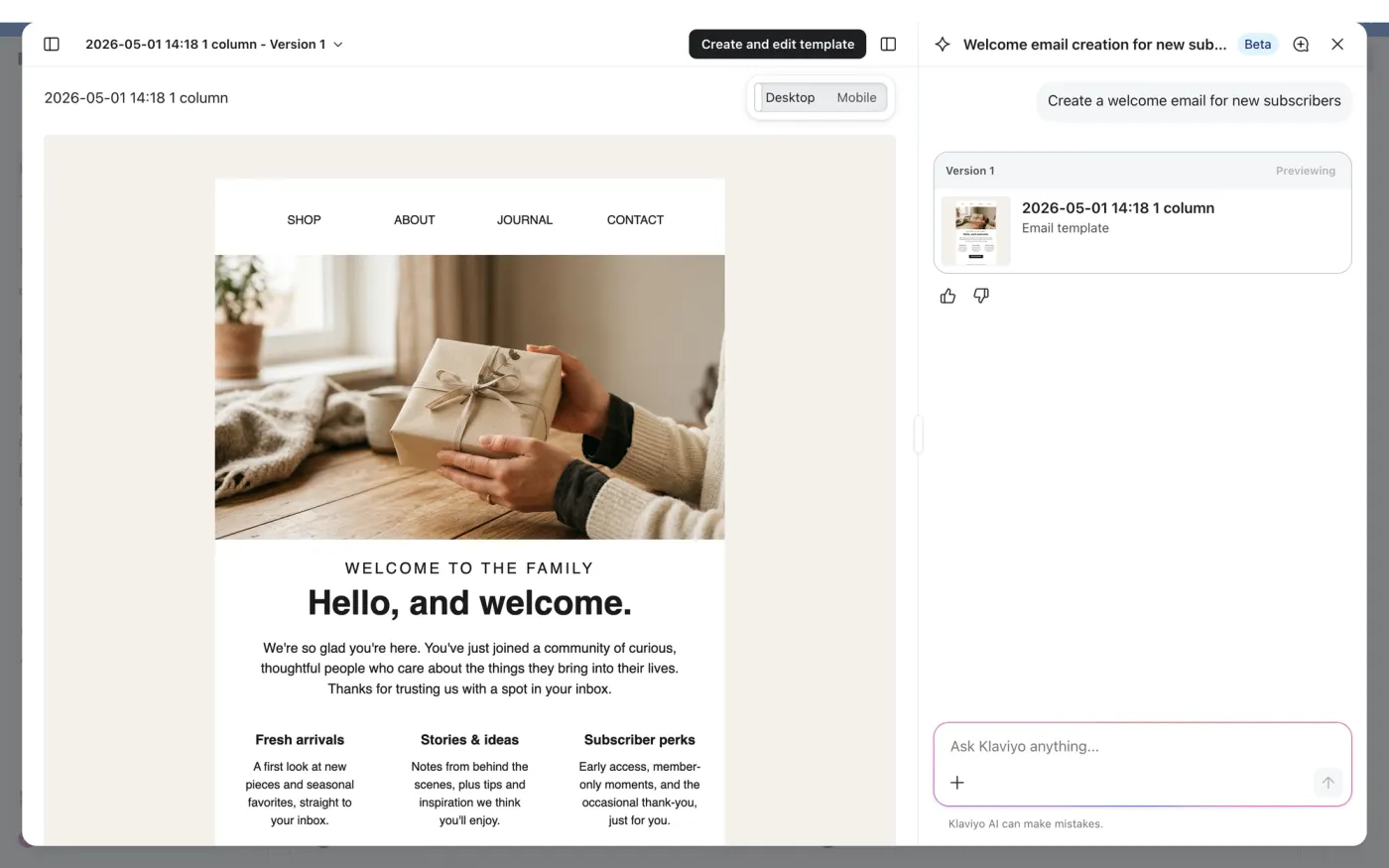
Composer can answer questions about your account performance, audit existing work and draft new marketing from a request written in ordinary language. It uses your account’s historical performance and brand context.
If it is available in your account, select the sparkle icon to open it. There is nothing to install. You can also open it while looking at a campaign, flow, form or template, then ask about that specific piece of work.
An audit can examine a campaign before sending, a flow’s structure or a segment’s logic. For a new flow, Composer drafts the structure before writing the messages, so you can review both. For a segment, it proposes the rules and shows a profile count for you to check before saving.
Campaign drafting covers email, SMS, MMS and push. Texts and push need the channel set up in your account first, and SMS and MMS also require a sending number. Asking for a text campaign does not complete that setup for you.
Does it send anything without you?
Composer does not publish customer-facing campaigns, flows or messages without your sign-off. It can run analyses and reports on a schedule you choose, but that is separate from approving a message to go live.
Generated content can be inaccurate. Read the offer, links, audience and sending settings before approving it. Klaviyo says Composer works best with content built in its drag-and-drop editor and is weaker on image-heavy or fully image-based templates. Give those drafts a closer read.
What should you ask it to make?
Give it the details you would put in a campaign brief: the product or goal, audience, offer, brand context and tone. For an illustrative email campaign, you could ask:
Draft an email introducing our new insulated bottle to customers who bought a backpack but have not bought a bottle. Do not add a discount. Use a practical, friendly tone, and show me the proposed audience and email before I approve anything.
Then inspect what it produced. Do the audience rules include backpack buyers and exclude bottle buyers? Is the profile count plausible for your store? Does the copy introduce a discount you did not offer? Open the links and inspect the sending settings before approval.
You can ask for revisions, but those can use more of your Composer allowance too.
How much does Composer cost?
As checked on 18 November 2026, Klaviyo customers receive a free Composer plan with $10 of usage a month, also subject to a weekly limit. Paid Composer plans start at $20 a month. You do not need a separate signup or credit card to start with the free plan.
| Composer plan | Monthly price | Monthly allowance | Usage window |
|---|---|---|---|
| Free | $0 | $10 of usage | Monthly allowance with a weekly cap |
| Paid | $20 | 2 times the free allowance | Resets on your billing date; no weekly cap currently |
| Paid | $100 | 10 times the free allowance | Resets on your billing date; no weekly cap currently |
| Paid | $1,000 | 100 times the free allowance | Resets on your billing date; no weekly cap currently |
Prices and limits from Klaviyo’s Composer plan guide, checked on 18 November 2026. Unused allowance does not roll over month to month.
The free plan’s monthly allowance resets at the start of your usage or billing month. If you have never signed up for a paid Klaviyo subscription, that is the 1st of each month. Composer’s Usage panel shows your reset date.
The free plan’s weekly cap took effect on 16 November 2026. You can hit it while you still have monthly allowance left, and unused weekly allowance does not carry into the next week. Check the reset time in Composer before assuming something is broken.
There is no fixed number of campaigns that your allowance buys. Usage depends on the request’s size, complexity and data. Klaviyo publishes estimated action costs, but actual usage can go above those ranges. Support and general-information questions do not use any of your allowance.
You also cannot see an exact action cost before running it. In full-page Composer, click Usage in the header to see what you have used and when it resets. In the sidebar, hover over the usage card. Usage appears after actions run.
On a paid plan, check flexible overages before you start. With this enabled, exceeding your allowance automatically buys more usage in $10 increments. You pay for the whole increment even if you use only part of it, and several can be charged in the same billing month.
If you have billing permission and want to turn that off, go to Settings > Billing > Preferences. In the Composer section, choose None, then save. For the rest of your subscription budget, see our Klaviyo pricing guide.
What can Klaviyo predict about your customers?
Predictive analytics includes estimates of customer lifetime value, churn risk and expected next-order timing. Look on a customer’s profile under Metrics and insights > Predictive analytics.
Customer lifetime value predictions need enough order history to work from. Your account must have:
- At least 500 customers with non-zero orders that were not cancelled or refunded. Having that many profiles alone does not qualify.
- Order data from an ecommerce integration or orders sent through the API.
- At least 180 days of order history, including an order in the last 30 days.
- Some customers who have placed 3 or more orders.
Those conditions apply to lifetime-value predictions, not to every Klaviyo AI feature. Klaviyo cautions that predictions work best across groups of customers and are not exact forecasts for an individual.
There is a specific limit to next-order timing: it does not consider which products the customer bought. If you know the replenishment cycles for most of your product categories, Klaviyo recommends a standard replenishment flow instead of relying on that predicted date.
How is the MCP connection different from Composer?
Composer is built into Klaviyo. The Klaviyo MCP server instead lets a compatible external AI assistant work with your account through an authorized connection, using supported tools and the permissions you grant.
MCP stands for Model Context Protocol. You work through a client such as Claude, ChatGPT, Cursor or VS Code, which can request a performance report or create a campaign through the connection. The remote-server setup guide requires an Owner, Admin or Manager role in Klaviyo. You sign in to Klaviyo and approve the account permissions the connection asks for.
For a custom remote connection, the server address is https://mcp.klaviyo.com/mcp, with no
trailing slash. If you only want analysis, add ?read-only=true to that address. This turns off
the tools that can make changes in your Klaviyo account. Without it, those tools are switched on.
That setting needs a custom connection. You cannot change these query parameters through the listed Claude connector or listed ChatGPT app. Follow the custom-connection instructions for your client if you need to enforce read-only access.
Do not carry Composer’s approval promise over to an external assistant. Its available actions depend on the MCP tools and permissions you grant. For reporting work, disabling write tools gives you a concrete control over what the connection can change.
What should you try first?
Choose one piece of work you can inspect. With Composer, draft a campaign for a specific product and audience, then check the audience rules, message and settings before approval. Read the Usage panel afterwards so you can see what that task consumed.
If you want to work through an external assistant, start by checking the connection’s access and requesting a report you can compare with your Klaviyo account. For predictions, first check whether your order history qualifies and whether the field answers the question you actually have.
Keep the result of that check: what was usable, what needed correction and what the task cost. Use it to decide which work you want AI to handle next.
Frequently asked questions
Is Klaviyo AI free?
Composer includes a free plan with $10 of usage a month, as checked on 18 November 2026. It has both weekly and monthly limits, so it is not unlimited AI usage. Paid Composer plans start at $20 a month. Other AI capabilities have their own requirements; the free Composer allowance is not a blanket allowance for every Klaviyo product.
Does Klaviyo Composer send emails automatically?
Composer does not send or publish customer-facing campaigns, flows or messages without your approval. It can run analyses and reports on a schedule you choose. That approval rule is specific to Composer and should not be assumed to govern an external assistant connected through Klaviyo’s MCP server.
Can you connect Klaviyo to ChatGPT or Claude?
Yes. Klaviyo documents remote MCP connections for both, requiring an Owner, Admin or Manager
role in Klaviyo and authorization of account access. To configure read-only=true, use a custom
connection; the listed Claude connector and listed ChatGPT app do not let you change that
query parameter.
Do you need 500 customers to use Klaviyo AI?
No. The requirement for at least 500 customers applies to customer lifetime value predictions, not every AI feature. Those customers must have orders worth more than zero that were not cancelled or refunded. Your account also needs at least 180 days of order history, including an order in the last 30 days. Some customers must have ordered 3 or more times. Klaviyo must receive the order data through an ecommerce integration or its API.
Sources
- Klaviyo: Customer Agent
- Klaviyo Help Center: Getting started with Composer · 3 Nov 2026
- Klaviyo Help Center: How your Composer plan works · 25 Oct 2026
- Klaviyo Help Center: Understanding predictive analytics · 29 Oct 2026
- Klaviyo Developers: Klaviyo MCP server
- Klaviyo Developers: Connect to the Klaviyo MCP server