If you are comparing Klaviyo’s features, you need more than a list of things it sells. Can you build the emails yourself? Will your store data feed the automations you want? And does the plan you are considering include the product you just saw on its website?
Klaviyo brings email campaigns, automated flows, customer segments, sign-up forms and reporting into one platform. You can add texts and other channels, and use Composer for AI help. But connected data, channel setup and product allowances matter: paying for email does not give you unlimited use of everything Klaviyo sells.
Our view: Klaviyo’s email designer, campaigns, flows and reports are strengths. The complexity of putting them together is the tradeoff. For the broader verdict, start with our Klaviyo review.
Which Klaviyo features would you actually use?
Klaviyo’s core marketing features are email campaigns, automated flows, customer segments, sign-up forms and reporting, with texts, WhatsApp and mobile push for additional channels. Start with the job you need done, then check the setup it depends on.
| Your job | Klaviyo feature | What you can do | What to check |
|---|---|---|---|
| Announce a launch or send a newsletter | Email campaigns and editor | Build a one-time email from a template | Your audience and send allowance |
| Follow up after a sign-up or checkout | Flows | Send an automated sequence with delays and different paths | The trigger data, filters and message status |
| Reach a particular group of customers | Segments | Group people by purchases, visits or engagement | The rules and their marketing consent |
| Collect new subscribers | Sign-up forms | Add pop-ups or embedded forms to your site | Where the form appears and which list receives sign-ups |
| Follow up through another channel | Texts, WhatsApp and mobile push | Combine channels with email in campaigns and flows | Channel setup, consent and usage charges |
| See how messages performed | Reports | Read engagement, conversions and attributed revenue | The attribution settings behind the figures |
Checked on 17 November 2026, US plans. What needs setup or an extra plan is covered further down.
Can you build emails and sign-up forms yourself?
You can build Klaviyo emails without writing code, using templates and drag-and-drop controls. For sign-ups, the form builder covers pop-ups, fly-outs, embedded forms and full-page forms.
Use email campaigns for one-time sends such as a product announcement or newsletter.
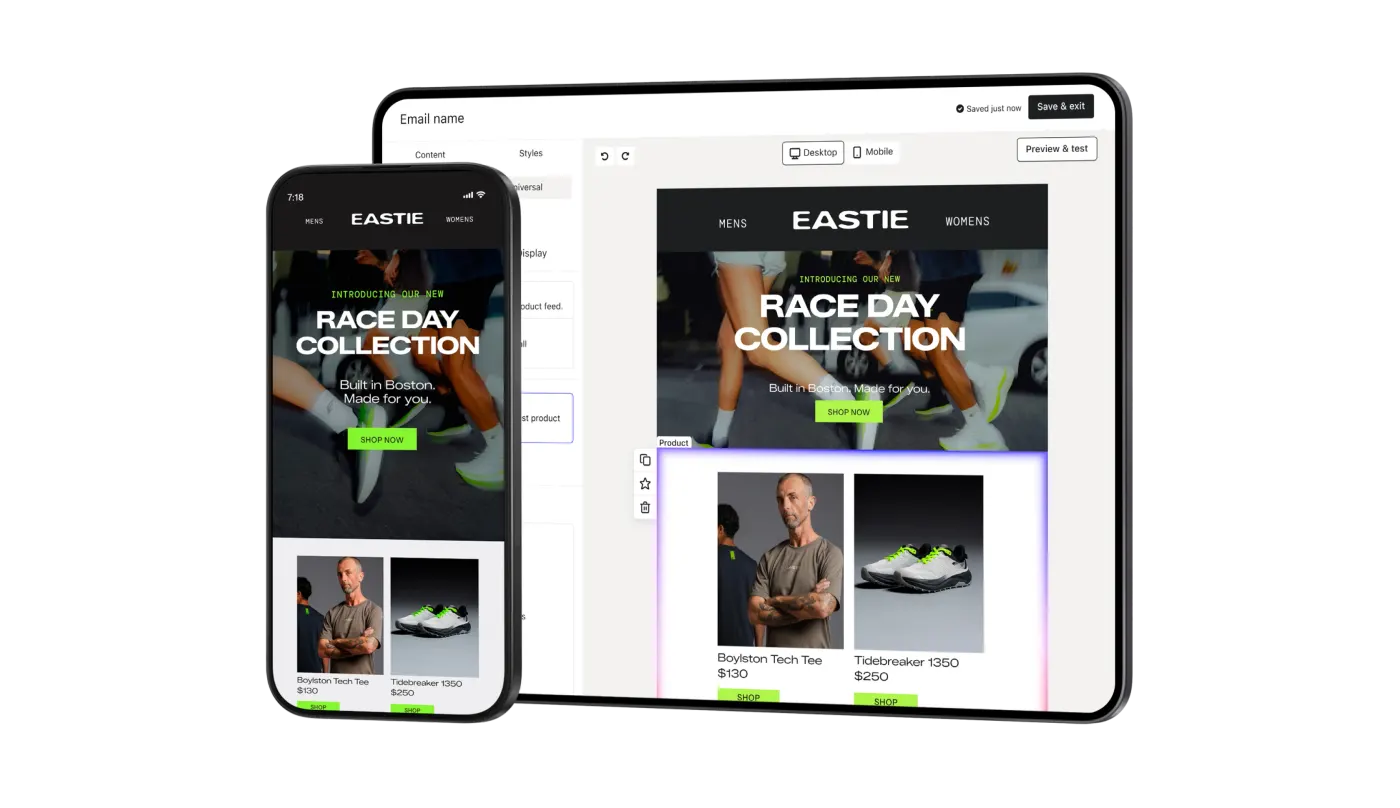
For a campaign, A/B testing lets you compare subject lines, message content or send times. Change one factor at a time so you know what you are comparing. A/B testing starts on the paid Email plan.
With the form builder, you can collect details over several steps and choose who sees a form using location, customer segments or cart value. That lets you plan a particular sign-up experience instead of showing the same form everywhere.
There is a limit to that flexibility. EmailToolTester’s hands-on review reports that Klaviyo has no dedicated landing-page builder, although a full-page form is a workaround. Check that distinction if you want to build campaign pages as well as collect sign-ups.
What store data can you use in Klaviyo?
Klaviyo integrations bring in the customer actions your targeting and flows use. With Shopify, these can include orders, checkout activity, product views and cart additions, but some events need onsite tracking enabled.
The Shopify data reference gives you a concrete check: open Analytics > Metrics, then filter the integration to Shopify. Look for the event your planned flow needs before you start building it.
For Shopify-branded product-view, collection-view, search and cart-addition events, turn on Track behavioral events in your Shopify integration settings and complete the onsite tracking setup. Check the source icon too: similarly named metrics can come from different tracking methods.
Checkout data has a condition worth knowing. A Checkout Started event can be recorded once Shopify sends the checkout information with a valid email address or phone number. With a customized checkout, the shopper may need to progress another step. The event carries product information and a link back to that shopper’s cart, which you can use in the reminder.
This is what to check when evaluating any integration: the specific event and details you need, rather than just the presence of your store’s logo on an integrations page.
How do flows and segments work together?
A segment identifies people who meet your conditions. A flow can start when someone enters that segment, then automate the follow-up messages. You can also trigger flows directly from actions such as starting checkout.
Flows can start when someone joins a list, starts checkout or has an order fulfilled. You then add messages, waiting periods and branches. To find a starting template, go to Flows > Create flow and filter the library by your store integration and channel.
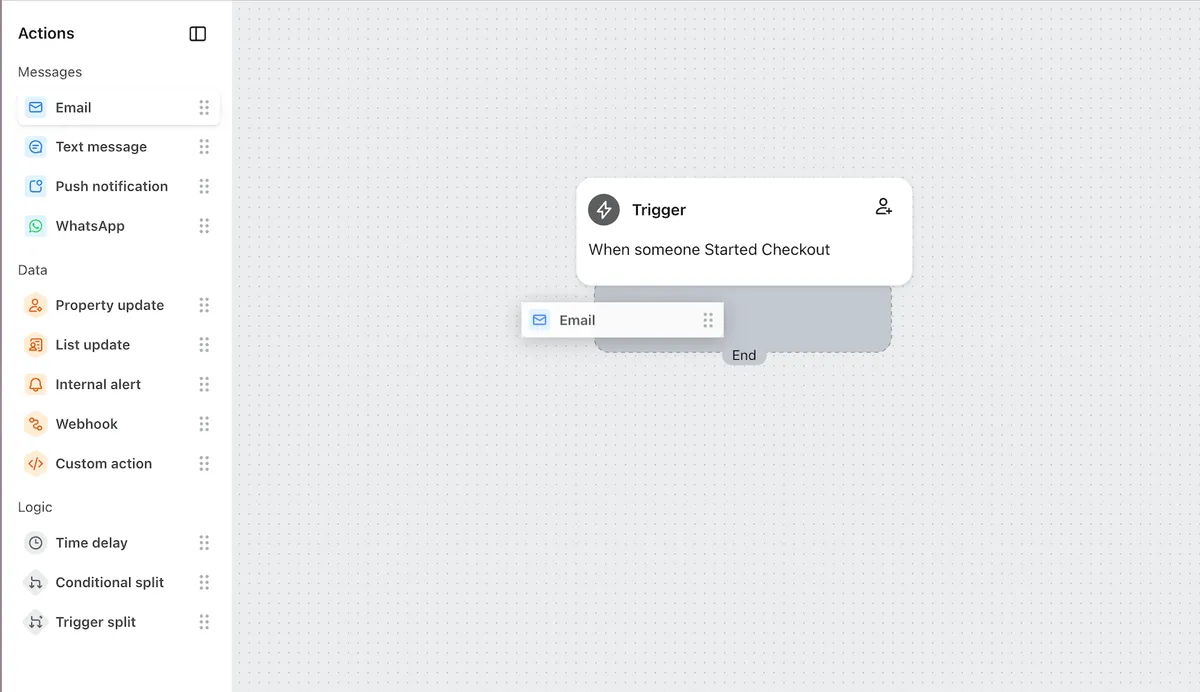
Filters matter as much as the messages. A checkout reminder can use a profile filter to exclude people who have ordered since entering the flow. Klaviyo rechecks profile filters before sending. Trigger filters decide who enters and are not rechecked at send time, so make sure the purchase exclusion is a profile filter.
Segments update as people meet or stop meeting your rules. An illustrative cross-sell audience could be people who bought running shoes but have not bought socks. To make it an email-subscriber audience, also require that they can receive email marketing and have subscribed, joining those conditions with AND.
That last part is easy to miss: a segment can draw from people who never opted in. Membership of a list alone does not confirm consent, either. Forms and imports add people to lists; a segment selects people by conditions.
The learning curve is uneven. EmailToolTester finds the email builder intuitive for beginners, but says building segments can become overwhelming because of technical language. For the team and setup question, read who Klaviyo is for.
What can you send besides email?
Klaviyo supports texts, WhatsApp and mobile push alongside email in campaigns and flows. Each channel needs its own setup; an email subscriber is not automatically a text subscriber.
Before you can collect SMS subscribers, enable SMS and get an active sending number for the intended country. The number may need verification or registration, and Klaviyo limits collection to supported countries. Having a shopper’s phone number, or their email opt-in, does not give you their SMS marketing consent.
Mobile push needs your own app, a connection through Klaviyo’s software development kit or a custom integration, and the recipient’s device opt-in. Connecting the app usually needs a developer. If you only have a website, this is not a ready-to-use extra channel. Klaviyo does not natively support browser push; its guide points to an API workaround.
What will the reports tell you?
Klaviyo’s campaign reports show opens, clicks, conversions and attributed revenue, with detail on link activity. Audience reports let you look at engagement for a group of profiles. The revenue figure uses attribution rules, rather than measuring the extra sales caused by your messages.
Before judging a revenue figure, check message attribution. Klaviyo credits eligible interactions within the windows you enable. Its default last-touch model credits the last eligible interaction before a conversion, and you can change the windows by channel and interaction.
What can AI help you do?
Composer is Klaviyo’s AI marketing agent. You can ask it to analyze performance, audit existing work or draft campaigns, flows and segments in ordinary language. If it is available in your account, open it through the sparkle icon.
You still approve customer-facing campaigns, flows and messages before they go live. Generated output can be wrong, so read the content and check the proposed settings. Klaviyo also says Composer is weaker with image-heavy or fully image-based templates than with content built in its drag-and-drop editor. Our view is that Klaviyo’s AI capabilities are not great yet, though improving.
Separate from drafting, predictive analytics includes estimates of customer lifetime value, churn risk and next-order timing.
To get lifetime-value predictions, your account needs:
- At least 500 customers with orders worth more than zero that were not cancelled or refunded.
- At least 180 days of order history, with an order in the last 30 days.
- Some customers who have placed 3 or more orders.
- Order data from an ecommerce integration or sent through Klaviyo’s API.
Those requirements concern lifetime-value predictions, not access to every AI feature. Klaviyo cautions that predictions work best across groups, rather than as exact forecasts for an individual.
Which features need an upgrade or a separate product?
You need paid Email to use campaign A/B testing. Texts and Composer include some usage, with extra charges beyond that allowance. These are the US plan terms checked on 17 November 2026.
The limits below count active profiles: contacts Klaviyo can email, including people who never subscribed. Your plan can therefore count more people than your subscriber list does.
| Feature or product | What your plan covers |
|---|---|
| Campaigns, flows and segmentation | Free includes up to 250 active profiles and 500 emails a month |
| Campaign A/B testing | You need paid Email or above |
| Social marketing, which connects DMs, comments and tags to customer profiles | Email covers 250 active profiles. Marketing covers the profile tier you select |
| Customer Hub, the customer accounts area on your site | Email covers 250 active profiles. Marketing covers the profile tier you select |
| Texts and Composer | Some usage is included. You pay for usage beyond that allowance |
| Personalization, for extra customer and product insights | You need a separate subscription |
| Advanced Klaviyo Data Platform, for understanding all your customer profiles | You need a separate subscription |
| Reviews, for collecting and displaying product reviews | Free and Email cover 50 orders a month. Marketing has no fixed order cap. Available only for Shopify and WooCommerce stores |
| Helpdesk, which brings human and AI support into one workspace | Free, Email and Marketing cover 10 tickets a month. You pay for extra usage |
US inclusions checked on Klaviyo’s pricing page and billing guide, 17 November 2026. Check your account for legacy terms and the usage allowance attached to each product.
For list-size costs and add-on budgets, use our Klaviyo pricing guide.
How should you evaluate the features for your store?
Pick a journey, such as a checkout reminder. Check the event data, inspect the flow’s filters, preview its messages and read the report after launch.
- Find the checkout event. In Shopify-connected accounts, inspect Analytics > Metrics and confirm the event contains the product details and cart-return link you need.
- Open a compatible flow template. Check its trigger and profile filters, including the rule that stops reminders after a purchase. Keep the messages in Draft while you inspect them.
- Customize and preview the messages. Klaviyo recommends checking its defaults before going live. If you use Manual status for a message, it queues for your review; other live messages further down the flow can still send.
- Read the report after launch. Look at clicks, conversions and credited revenue alongside the attribution settings you chose.
Use that check to write down what you can configure yourself, what needs help, and what needs another subscription. That gives you a specific setup and budget to assess.
Frequently asked questions
What are Klaviyo’s main features?
Klaviyo’s main marketing features are email campaigns, a drag-and-drop editor, automated flows, customer segments, sign-up forms, integrations and reporting. It also supports texts, WhatsApp and mobile push, and Composer for AI assistance. Channel setup and separate product allowances still apply; an email plan does not include unlimited use of every product.
Can you use Klaviyo’s automation for free?
Yes. On 17 November 2026, Klaviyo’s US Free plan included campaigns, flows and segmentation, capped at 250 active profiles and 500 emails a month. Active profiles include non-subscribers Klaviyo can email. Campaign A/B testing started with paid Email.
Does Klaviyo have web push notifications?
Klaviyo does not natively support web or browser push; its help guide mentions an API workaround. Its mobile push feature requires an app, a connection through a software development kit or custom integration, and device opt-in. A website alone does not meet those requirements.
Does Composer send campaigns without your approval?
No. Composer can analyze data, audit work and draft campaigns, flows and segments, but it does not send or publish customer-facing campaigns, flows or messages without your approval. Check its output before approving it because generated content can contain errors.
Sources
- Klaviyo — Email marketing
- Klaviyo Help Center — How to A/B test an email campaign · 27 Oct 2026
- Klaviyo — Web forms
- EmailToolTester — Klaviyo review · 24 Aug 2026
- Klaviyo Help Center — Shopify data reference · 26 Oct 2026
- Klaviyo Help Center — Getting started with flows · 3 Nov 2026
- Klaviyo Help Center — Understanding the difference between segments and lists · 27 Oct 2026
- Klaviyo Help Center — Understanding SMS consent collection · 26 Oct 2026
- Klaviyo Help Center — Introduction to mobile push notifications · 6 Nov 2026
- Klaviyo — Email reporting · 7 Sept 2023
- Klaviyo Help Center — Understanding Klaviyo message attribution · 28 Oct 2026
- Klaviyo Help Center — Getting started with Composer · 3 Nov 2026
- Klaviyo Help Center — Understanding Klaviyo's predictive analytics · 29 Oct 2026
- Klaviyo — Pricing
- Klaviyo Help Center — How Klaviyo billing works · 9 Nov 2026